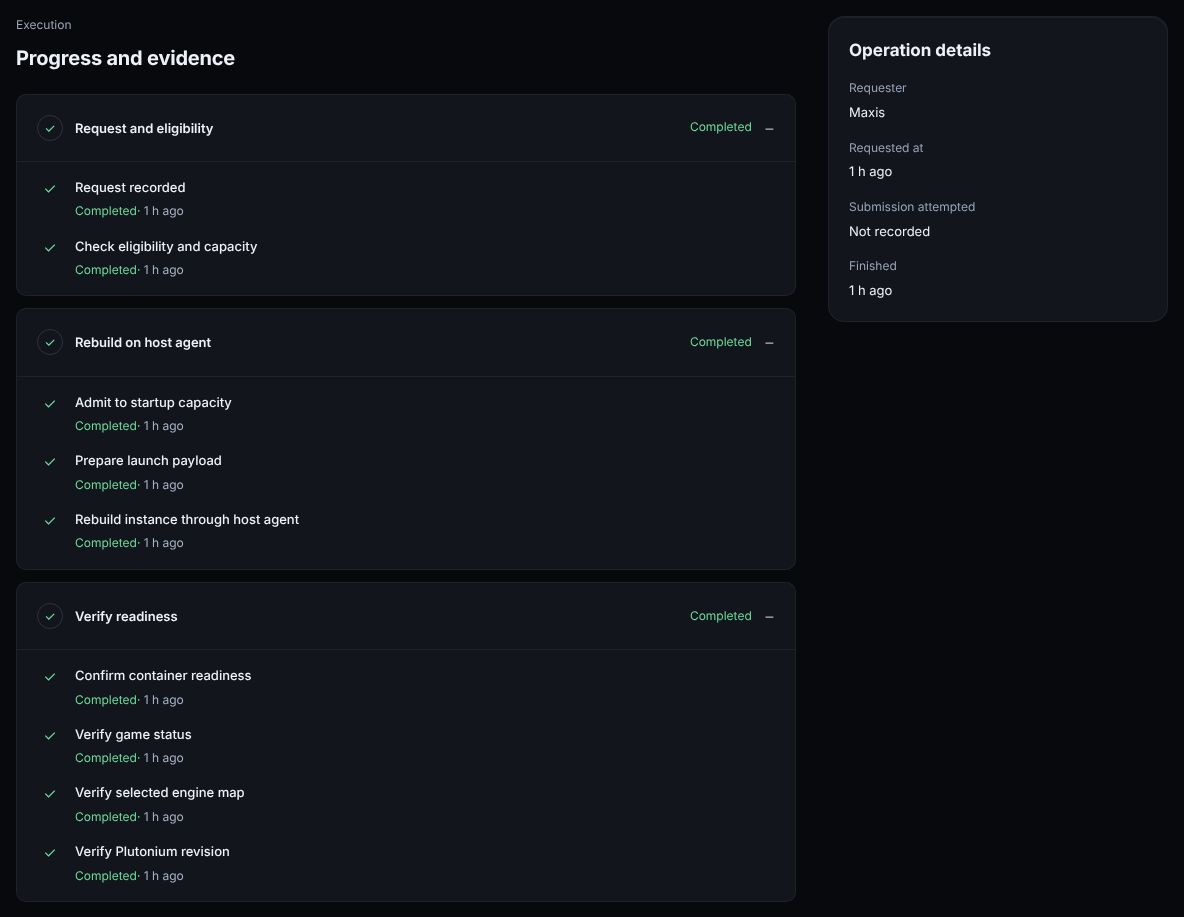
Every time on the job page is relative, so on a finished operation they all read the same and you can't tell how long each step took. On a rebuild that finished an hour ago, every step, check and detail row says "1 h ago".
RelativeTime.svelte:12 puts the absolute time only in a hover tooltip, which isn't available on touch screens.
Steps (ProvisioningProgress.svelte:40), checks (ProvisioningProgress.svelte:73) and the details card (+page.svelte:174-178) all use RelativeTime.
Screenshots
From the synthetic UI preview. Progress records and a launch recipe were added to the disposable fixture database using the labels the worker records. "After" images are mockups made in an uncommitted copy.
Before:
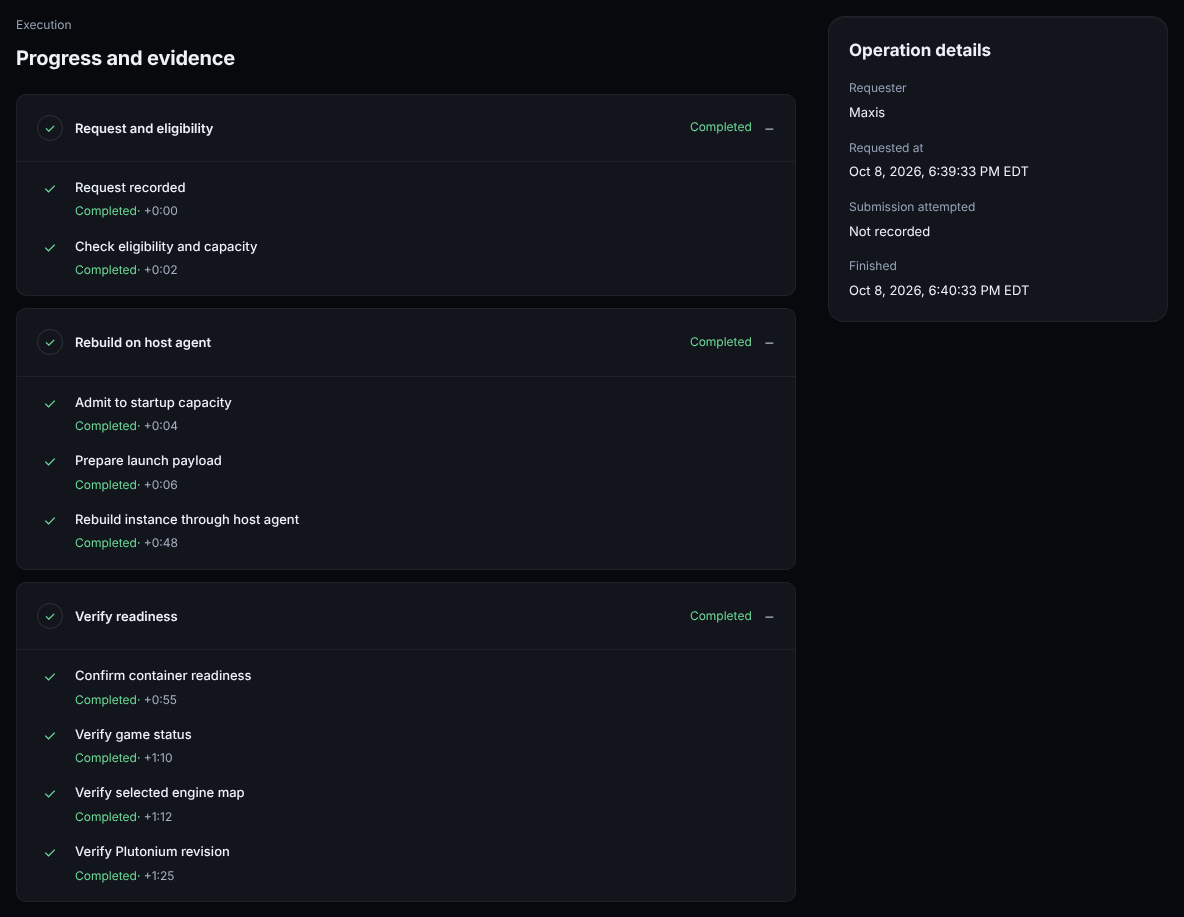
After (mockup):
Fix
Show the absolute start and finish once (the summary line in #86)
Show each step and check as time since the operation started, e.g. "+0:48"
Every time on the job page is relative, so on a finished operation they all read the same and you can't tell how long each step took. On a rebuild that finished an hour ago, every step, check and detail row says "1 h ago".
- `RelativeTime.svelte:12` puts the absolute time only in a hover tooltip, which isn't available on touch screens.
- Steps (`ProvisioningProgress.svelte:40`), checks (`ProvisioningProgress.svelte:73`) and the details card (`+page.svelte:174-178`) all use `RelativeTime`.
**Screenshots**
_From the synthetic UI preview. Progress records and a launch recipe were added to the disposable fixture database using the labels the worker records. "After" images are mockups made in an uncommitted copy._
Before:
After (mockup):
**Fix**
- [x] Show the absolute start and finish once (the summary line in #86)
- [x] Show each step and check as time since the operation started, e.g. "+0:48"
Reviewed dbbe3749e2. Both fix items are done, so I'm closing this.
Checklist
Absolute start and finish once. A summary line under the title shows the requester and the absolute start and finish times (+page.svelte:110-117). The Requester, Requested at and Finished rows are gone from the details card, so nothing is repeated.
Offsets from the start. The new OperationTime component shows +m:ss or +h:mm:ss from the operation start, with the absolute time in its tooltip and accessible label. Steps, checks, checkpoints, the command card, activity entries and "Last evaluated" all use it. I checked formatTimeOffset (duration.ts:4) directly: it gives +0:48, +1:00:01 and −0:06, handles UTC timestamps without an offset, and returns nothing when the start is missing.
Review notes
Good extra: ui-patterns.md now documents the rule, so other detail pages can follow it.
In the synthetic preview, a completed rebuild reads "Started Oct 9, 2026, 9:06:34 AM EDT · Finished Oct 9, 2026, 9:07:34 AM EDT", and its steps run from +0:00 to +1:25.
The 4 related test files pass locally (210 tests), and npm run check reports 0 errors.
Minor and non-blocking: offsets keep counting hours past a day, so a record made long after the start reads like +72:00:00. "Identity deleted" (+page.svelte:190) is the likely case. The tooltip still has the absolute time, but showing the absolute time for records made after the operation finished would read better.
Minor and non-blocking: formatTimeOffset and OperationTime have no unit test. The new "Offsets below show time from the operation start…" line (+page.svelte:116) is also the kind of explanatory copy #88 suggests trimming.
Reviewed dbbe3749e2613d8c799e156fcf07b76aa3404ae7. Both fix items are done, so I'm closing this.
**Checklist**
- [x] **Absolute start and finish once.** A summary line under the title shows the requester and the absolute start and finish times (`+page.svelte:110-117`). The Requester, Requested at and Finished rows are gone from the details card, so nothing is repeated.
- [x] **Offsets from the start.** The new `OperationTime` component shows `+m:ss` or `+h:mm:ss` from the operation start, with the absolute time in its tooltip and accessible label. Steps, checks, checkpoints, the command card, activity entries and "Last evaluated" all use it. I checked `formatTimeOffset` (`duration.ts:4`) directly: it gives `+0:48`, `+1:00:01` and `−0:06`, handles UTC timestamps without an offset, and returns nothing when the start is missing.
**Review notes**
- Good extra: `ui-patterns.md` now documents the rule, so other detail pages can follow it.
- In the synthetic preview, a completed rebuild reads "Started Oct 9, 2026, 9:06:34 AM EDT · Finished Oct 9, 2026, 9:07:34 AM EDT", and its steps run from `+0:00` to `+1:25`.
- The 4 related test files pass locally (210 tests), and `npm run check` reports 0 errors.
- Minor and non-blocking: offsets keep counting hours past a day, so a record made long after the start reads like `+72:00:00`. "Identity deleted" (`+page.svelte:190`) is the likely case. The tooltip still has the absolute time, but showing the absolute time for records made after the operation finished would read better.
- Minor and non-blocking: `formatTimeOffset` and `OperationTime` have no unit test. The new "Offsets below show time from the operation start…" line (`+page.svelte:116`) is also the kind of explanatory copy #88 suggests trimming.
Blocking a user prevents them from interacting with repositories, such as opening or commenting on pull requests or issues. Learn more about blocking a user.


Every time on the job page is relative, so on a finished operation they all read the same and you can't tell how long each step took. On a rebuild that finished an hour ago, every step, check and detail row says "1 h ago".
RelativeTime.svelte:12puts the absolute time only in a hover tooltip, which isn't available on touch screens.ProvisioningProgress.svelte:40), checks (ProvisioningProgress.svelte:73) and the details card (+page.svelte:174-178) all useRelativeTime.Screenshots
From the synthetic UI preview. Progress records and a launch recipe were added to the disposable fixture database using the labels the worker records. "After" images are mockups made in an uncommitted copy.
Before:

After (mockup):

Fix
Reviewed
dbbe3749e2. Both fix items are done, so I'm closing this.Checklist
+page.svelte:110-117). The Requester, Requested at and Finished rows are gone from the details card, so nothing is repeated.OperationTimecomponent shows+m:ssor+h:mm:ssfrom the operation start, with the absolute time in its tooltip and accessible label. Steps, checks, checkpoints, the command card, activity entries and "Last evaluated" all use it. I checkedformatTimeOffset(duration.ts:4) directly: it gives+0:48,+1:00:01and−0:06, handles UTC timestamps without an offset, and returns nothing when the start is missing.Review notes
ui-patterns.mdnow documents the rule, so other detail pages can follow it.+0:00to+1:25.npm run checkreports 0 errors.+72:00:00. "Identity deleted" (+page.svelte:190) is the likely case. The tooltip still has the absolute time, but showing the absolute time for records made after the operation finished would read better.formatTimeOffsetandOperationTimehave no unit test. The new "Offsets below show time from the operation start…" line (+page.svelte:116) is also the kind of explanatory copy #88 suggests trimming.